Ditch LinkedIn. Make a Website
The why and how of reclaiming professional autonomy
2026-06-05 · 8 min · #culture
I have never been an active user of LinkedIn. I created an account a couple of months ago after a professor told me I should have a presence there. I was skeptical, but decided it was important enough to have access to any opportunities and connections I would have otherwise be missing.
I no longer have access to my account. I recently tried to log in and was met with a friendly greeting.
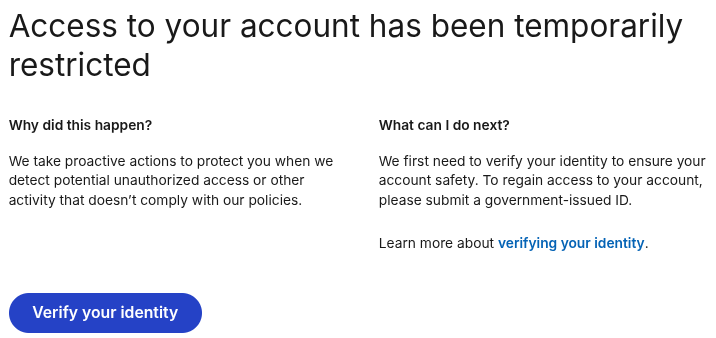
LinkedIn refuses to let me access my account unless I upload my government-issued ID. Since I'm not going to send my ID to Microsoft and Palantir, I'm locked out of LinkedIn and the professional opportunities behind its walls.1
Update 2026-07-12: For a class I was required to create a new LinkedIn account. LinkedIn let me make a new one after giving them my phone number. The old one is still locked.
If having a LinkedIn profile is as important to one's career as I'm told, then I have just been locked out of a vital connection to future opportunities. Consider how bad this is: a single company could lock you out from access to your career because of some automated trigger. Understandably, many people would be willing to turn over their IDs to retain that.
Thankfully, I don't believe this to be the case. LinkedIn isn't the be-all and end-all to professional engagement. In fact, it's far inferior to an alternative that's existed long before LinkedIn and will undoubtedly long outlast it.
This alternative is the personal website, like this one! I believe having a Web presence is just as useful, if not more so, than having a LinkedIn profile. Not just for professional opportunities, but for self-expression, community, and more.
What does a LinkedIn profile provide that your website could not? On both, you can write your bio, post a resume, share updates on your educational or professional status, and link to others in your network.
Most of my peers have not gotten hired through their LinkedIn profiles. Meanwhile, I have gotten hired for freelance work through my website.
As far as communications goes, just use email. There's no need to rely on Microsoft.2 That's how you can contact me! I check my email and hopefully you check yours. I welcome both professional and interpersonal correspondence. If you want to work with me, ask me a question, do research with me, or just say hi, feel free to send me an email!
If you haven't created a professional email yet, make one! You don't want to publish your personal email and you want your professional email address to be easily accessible.
A website can perform the essential functions of a LinkedIn profile. But what can a website have that a LinkedIn profile can't? Plenty!
A website provides you with the opportunity to express yourself. You can create it however you like, with whatever content or design you wish. You can add or omit any information you feel comfortable adding or omitting. You can use whatever name you feel comfortable using. Meanwhile, LinkedIn requires whatever name is on your ID—which may not be what you use professionally.
As a bonus, the act of creating a website shows aptitude starting a LinkedIn profile could never show.
How to Make a Website
So you want to make a website! If you are still in school or are just starting your career, you might not know where or how to begin. Maybe you've heard an ad for a specific service and are inclined to start there. Maybe you started a blog years ago. In any case, here are my suggestions for you to get started.
Domain Name
The most important step is to buy your own domain name. Since we're talking about a professional website, make it some variation of your professional name or the username most commonly associated with your professional work (you can make a new one if that works best for you). A good place to do this is Porkbun3.
If you have a common name, firstlast.com may not be available. Be creative! I chose gracefulliberty.com because my first preference wasn't available and "Anna" means "Grace". The goal is to choose something short, memorable, and hard to confuse with another person's domain.
Protect Yourself from Predatory Domain Companies
When seeing if domain names are available, avoid looking them up directly on a domain name registrar. Some companies, like GoDaddy, track your searches and may buy domains you're looking at to resell them to you at a higher price.
Instead, use a tool like ICANN Lookup to see if a domain has already been registered. It will show details about the domain if it is in use, and will display an error if it's available.
Again, your domain name is the most important part of your website. As long as you keep paying for your domain name, it's yours. You can change your host and website will work the same as before. And if the company you used to register the domain becomes shady, you can transfer it. You're not stuck under firstlast.wordpress.com forever.
You can even set up your email address to be something like anna@gracefulliberty.com.
Hosting: The Simple Approach
You don't need to know how to code to build a website. One of the best platforms for this is WordPress. WordPress is an easy-to-use Content Management System (CMS) that is used by most websites. It's easy to set up and you can choose from many different services to host it for you (or host it yourself). It normally costs a few dollars per month to set up.
One of the main benefits of using WordPress is its community. There are countless free templates and plugins you can use in your website. You can access them directly from WordPress.
There are so many places to find WordPress hosting these days. I recommend looking around and choosing a service that looks best to you. There are countless tutorials on how to use WordPress. I encourage you to look up one if you'd like step-by-step instructions for getting your site set up.
Another major benefit of WordPress is that it is open source. This means you can export your data and move it from one host to another. This is not the case with services like Wix and Squarespace, where you'd have to re-create your website from scratch if you stop liking your previous host.
Hosting: The Technical Approach
If you're a computing major or someone otherwise interested in computers, I recommend learning to use a static site generator of your choice (I currently use Zola), making your own template, and hosting at statichost. It's a good balance between the convienence of a full Content Management System like Wordpress and the tedium of writing HTML for each page directly.
This is what I do for my website. I enjoy it!
Next Steps
I could write so much more about making a website. There are so many options about how to design it, what to publish on it, and more. My goal here is to give you the tools to get started. My hope is that after walking you through the first few steps, you will have the inertia to make the next ones.
Some possible next steps to get your creativity flowing:
- Create an "about me" page
- List projects you have worked on
- Consider starting a blog
- Publish a copy of your resume (removing information you're not comfortable being public)
- Link to other websites or blogs you find interesting
If you run into any issues setting up your website, or just want to show me what you've made, feel free to email me! If you know me I will even link to your website from my own. We all have the opportunity to support each other in our professional and academic journeys.
-
This isn't even the worst of it. If you want to be verified on LinkedIn, they ask for even more invasive information that they link with Persona and use for "AI" training. ↩
-
My condolences if you're on Outlook, Hotmail, or the like. ↩
-
I am not affiliated with Porkbun. Make sure to do your own research before relying on any specific company. ↩